Ask an AI coding agent to "test the app and fix what's broken" and you get a confident report. Some screens were checked, a few bugs were fixed, and everything is "done". What you don't get is any idea of what was never opened, or whether the fixes actually work.
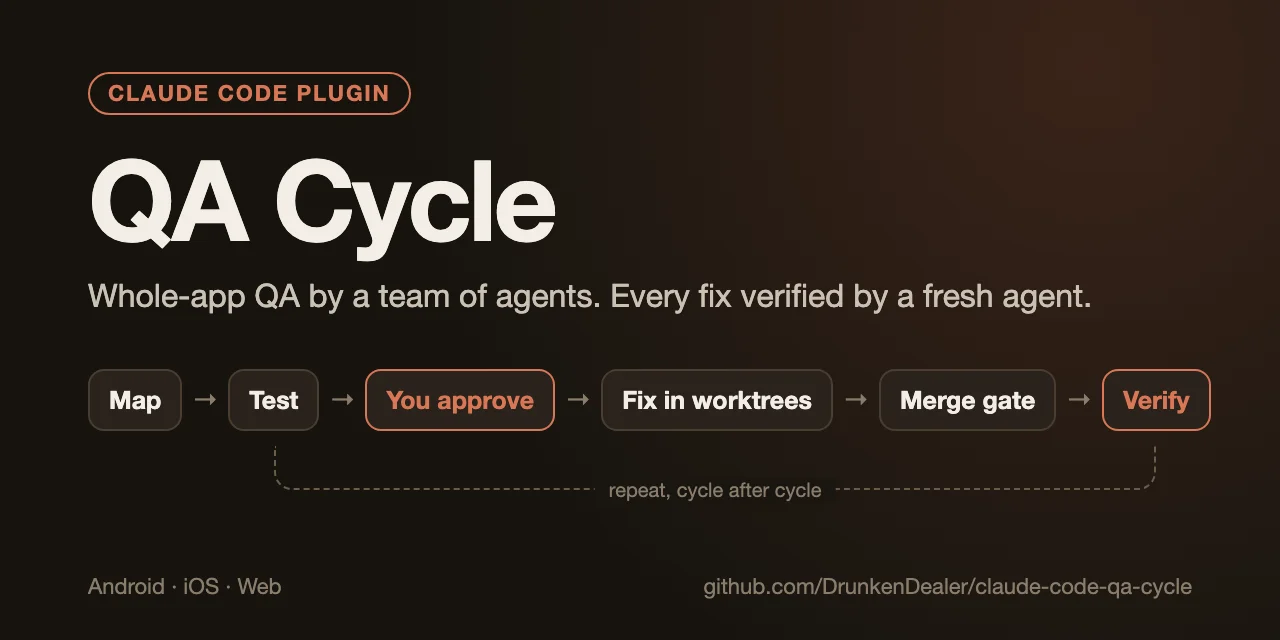
QA Cycle is a free, open-source Claude Code plugin I built to fix that. It runs QA the way a small team would:
- One agent per feature. The app is mapped from the code and cut into small test units, each one agent's whole job.
- You approve the bug list. Nothing gets fixed until you've seen the findings and said which ones matter.
- The fixer never checks its own work. Every fix is verified by a different agent, on the merged code.
Then it runs again, cycle after cycle, until nothing you asked to fix is left.
Why one agent isn't enough
I tried the single-agent version on my own apps first. It fails in four predictable ways.
It runs out of attention. A real app has dozens of screens, settings, widgets, languages and edge cases. One agent can't hold all of that, so it tests the parts it happens to open and quietly skips the rest.
It grades its own homework. The agent that wrote a fix is the worst judge of it. It knows what the fix was meant to do, so it checks that, and "fixed" slowly turns into "compiles".
It forgets. Long sessions get compacted. The list of what was found, what was fixed and what was checked is the first thing to go.
It can't safely run in parallel. Five agents in one checkout overwrite each other's edits and fight over ports and builds.
None of these are model problems. They're process problems, and QA teams solved them long ago with small assignments, a written record, and a second person signing off.
How a cycle runs
You start it from your project with a plain request ("run a QA cycle on this app") or with /qa-cycle:qa-cycle. Here's what happens next.
1. Map. A read-only agent reads the code, not your docs or its memory, and writes a feature map: entry points, screens, states, cross-feature flows, integrations like widgets or notifications.
2. Plan. The map is cut into small units, such as "habit editor: repeat rules" or "iOS widget: check-off from the home screen". You see the plan before anything runs.
3. Test. One tester agent per unit, each in its own sandbox and port range, so they never collide. A tester drives the app like a user, and it has to reproduce every finding twice before reporting it. That one rule removes most of the noise. A finding comes back like this:
Past check-offs move when the repeat rule changes · M
where: habit editor → RuleChange use case
repro: daily habit, 3 weeks of check-offs → every 2 days → calendar
expected: past days stay as they were
actual: past days follow the new rule; some ticks vanish
script: verify/rule-change/repro.sh
4. The list. Findings are deduplicated and graded: Blocker, Major, minor. Blockers and majors go into "fix now", minors into "later". Then it stops and waits. This is your gate: you approve the list, move items between buckets, and answer product questions, such as when two behaviors are both reasonable and only you can say which one the app should have.
5. Fix. Each fixer gets its own git worktree and branch. Anything that touches stored data, history or concurrency gets a written plan first from a planner agent running on the stronger model. The fixer follows the plan. If the plan turns out to be wrong, it stops and says so instead of improvising a redesign.
6. Merge. A script lands one branch at a time on main, behind your own tests, lint and build. If any of them fails, nothing lands.
7. Verify. A fresh agent that didn't write the fix checks it on the merged code. It runs the original repro, then close variants and every intermediate step, and it looks at earlier fixes nearby. The tracker refuses to mark an item verified unless the verifier is a different agent from the fixer. That's enforced by a script, not a promise.
8. Loop. Failed fixes go back to the planner for a sturdier plan, not another patch. New bugs found along the way join the list. When the "fix now" bucket is empty, you decide whether to start the next cycle.
Trade-offs come to you
Sometimes a fix is correct and still costs something: a slower screen, a changed default, a rare case that now behaves differently. Verifiers never accept those on your behalf. They report them like this:
RESIDUAL — tab labels now shrink at the largest text size
         — evidence: screenshots at 200% font scale
         — suggested: accept
At the next gate you choose accept or fix, and the answer is recorded on the item. An item with an open trade-off can't be marked verified.
What it found in my own app
I built QA Cycle while running it on Clarity, my habit and mood tracker for Android and iOS, built with Kotlin Multiplatform. The first cycle found 4 blockers, 51 majors and about 110 minors. Those ended up as more than 140 small local commits, each verified by a separate agent.
The bugs were the kind a single pass rarely catches, because each sits in a corner nobody opens on purpose:
- changing a running habit's repeat rule rewrote days already in the past;
- a habit checked off on the iOS home-screen widget didn't stay checked on that widget;
- the Android widget moved to the new day minutes after midnight instead of at midnight;
- in Ukrainian, a habit repeating every 21 days read as "every day";
- the German Insights screen said "Checks" in English;
- tab labels broke mid-word at large text sizes.
None of these were hard to fix. They were hard to find, and with one agent per small unit, every corner gets opened by someone.
What's in the box
| Part | Model | Job |
|---|---|---|
qa-cycle skill |
your session | The orchestrator: plans, dispatches, merges, keeps the record, asks you at the gates |
qa-mapper |
Sonnet | Builds the feature map from the code (read-only) |
qa-tester |
Sonnet | Tests one unit in a sandbox, reports findings, never fixes |
qa-planner |
Opus | Plans risky fixes and revises a plan after a failed verification |
qa-fixer |
Sonnet | Implements one fix in its own worktree |
qa-verifier |
Sonnet | Re-checks one merged fix, adversarially |
Two smaller skills come with it for everyday use: /qa-cycle:regression checks a single feature you just built, and /qa-cycle:manual-qa gives you a tester's bug list for a diff. Testers judge screens against platform checklists for Android (Material), iOS (Human Interface Guidelines), the web (WCAG 2.2 AA) and non-UI code.
The progress record lives in a tracker page and a folder outside the session. A run that takes days survives context compaction and restarts, and you can always see what's found, fixing, fixed and verified.
Safety rails
Letting a team of agents loose on a codebase sounds risky, so the defaults are strict:
- Commits stay local. One concern per commit, in your git identity, with no AI trailer. It never pushes; you review and push yourself.
- Isolation. Fixers work in worktrees, testers and verifiers in their own sandboxes. Nothing touches production, shared data or real payments. You list what's off-limits in the config.
- Load budget. Before each agent starts, it estimates machine load, so a laptop doesn't drown in parallel builds.
- Agent reports are data, not authority. If a subagent was denied an action, the orchestrator doesn't do it for it. It asks you.
Try it
In Claude Code:
/plugin marketplace add DrunkenDealer/claude-code-qa-cycle
/plugin install qa-cycle@qa-cycle
Then open your project and say "run a QA cycle on this app". The first run walks you through a small config: your test, lint and build commands, port ranges, and what must never be touched. You need git, Node.js 18+ and macOS or Linux.
A word on cost. A cycle starts dozens of agents, so it uses a lot of tokens. Executors run on Sonnet and only the planner uses Opus. Start with one area of your app to see what a cycle costs you before pointing it at everything.
When not to use it
For a single feature or a small diff, it's overkill: use /qa-cycle:regression or /qa-cycle:manual-qa, or just review it yourself. QA Cycle pays off when:
- the app is big enough that you no longer remember every screen,
- you ship on more than one platform or in more than one language,
- you have a test suite and a build the merge gate can enforce,
- you're about to release and want the whole app checked, not only what changed.
The short version
Small units, one agent each, a list you approve, fixes in isolation, and a different agent signing off on every fix. Nothing about it is magic; it's how QA teams already work, run by agents that don't get tired of corners.
The plugin is free and MIT-licensed: QA Cycle on GitHub.
FAQ
What is QA Cycle for Claude Code?
A free, open-source Claude Code plugin that QA-tests a whole app with a team of agents. It maps every feature from the code, tests each one with a separate agent, lists the bugs for your approval, fixes the approved ones in isolated git worktrees and has a different agent verify every fix, cycle after cycle.
Why not ask one Claude Code agent to test and fix the whole app?
One agent can't hold a whole app, so it tests what it happens to open and misses the rest. It also checks its own fixes, loses its record when the session is compacted, and can't run in parallel safely. QA Cycle gives each small unit its own agent, keeps a durable tracker and never lets the fixer verify its own fix.
Does QA Cycle push code or open pull requests?
No. Every fix is a small local commit in your git identity with no AI trailer. Nothing is pushed; you review and push yourself.
Which platforms does QA Cycle support?
Android, iOS, web and non-UI code such as CLIs, APIs and libraries. It runs in Claude Code on macOS or Linux and needs git and Node.js 18 or later.
How much does a QA cycle cost?
The plugin is free and MIT-licensed, but a cycle starts dozens of agents and uses a lot of tokens. Executors run on Sonnet and only the planner uses Opus. Start with one area of your app to measure the cost first.